The Ecommerce SEO Audit Checklist We Use on Every Client Store (108 Points + Free Template)

Imagine for a moment that you are sitting across the table from us, and that you have just told us your online store is not attracting as many visitors from Google as it once did. The first thing we would do is hand you a checklist, the same ecommerce SEO audit checklist we use on every client store, and walk through it with you one check at a time.
That checklist has grown out of more than 10 years of ecommerce SEO work at VRankOne, and over that time we have removed advice that no longer works and added checks for artificial intelligence (AI) search tools such as ChatGPT, which many older lists still ignore. Most SEO checklists were written with blogs and company websites in mind, so we rebuilt ours around the way online stores really behave, with their thousands of product pages, their filters and their apps.
This checklist keeps the health of your ecommerce website organized, which is why it comes as a spreadsheet of 108 checks across 13 sections that you can download and edit however you like.
Shall we begin? Click the button below to download your copy, and keep it open as you read.
Download the free checklist sheet and audit alongside this guide.
From here, we will walk you through each check in plain English, explain why it matters for a store and show you where to find the problem in Screaming Frog, Semrush or Google’s free tools, so that by the end you will have audited your own store.
Do I Need To Read All of This Guide?
A fair question, and the honest answer depends on what you want from it. If you wish to learn how to audit an online store properly, we recommend reading the whole guide one section at a time, because each section builds on the one before it, and we have kept every section short and plain so that no SEO background is needed.
If time is short, open the sheet first and jump to the sections where you need the most help, then work through the rest at your own speed, following the links we share along the way, since many of them lead to useful tools and to Google’s own guidance.
How To Use This Checklist
Here is how we suggest you use this guide together with the checklist sheet, in the same order we would follow if we were working through it beside you:
- Download the free checklist sheet and keep it open next to this blog.
- Read one section at a time, since each one explains what we check, why it matters and how to find the problem.
- Use the tool we point to in each section to run the check on your own store.
- Mark off each row in the sheet as you finish it, and note anything you find along the way.
- Sort your fixes by the Impact and Difficulty ratings in the sheet.
The “Impact” column tells you how much a fix is likely to matter for your store, while the “Difficulty” column tells you how hard that fix is to carry out, and together they answer a question every store owner eventually asks: where should we start? Our advice is to begin with the rows marked High impact and Easy difficulty, because those fixes usually deliver results fastest and build the confidence to tackle the harder ones.
Screaming Frog and Semrush will find most of the issues covered here, and Google’s free tools, namely Search Console, Google Analytics 4 (GA4), PageSpeed Insights and the Rich Results Test, take care of most of the rest.
If your store runs on Shopify, please look for the Shopify label, which marks the checks that apply only to that platform.
The Two Tools We Use To Find Issues
Two tools will do most of the heavy lifting in this checklist, and we use both on every audit: Screaming Frog SEO Spider and Semrush.
We would recommend you to buy the paid license of Screaming Frog for an in depth analysis as the free version only allows you to crawl 500 links which also include non-HTML files like images, CSS and JS files.
| Feature | Screaming Frog SEO Spider | Semrush |
|---|---|---|
| Runs on | Your computer | Your browser |
| Main report | Crawl results split into tabs like Response Codes, Directives and Sitemaps | Site Audit, with Errors, Warnings and Notices |
| Best for | Broken links, redirects, titles, H1s, images, canonicals and duplicate pages | Site health overview, speed, keyword and competitor gaps and backlink checks |
At the end of each section below, we add a “How to find it” line that points to the exact report to open in these tools.
Shopify
Shopify blocks most crawlers unless you add a signature to Screaming Frog first, so a crawl without one often returns errors instead of your pages.
1. The Basics: Tracking and Search Console Hygiene
Tracking comes first in any ecommerce site audit, and it is where we begin with every store, because if your numbers are wrong, every decision you make from them will be wrong too.
You Can’t Audit What You Can’t Measure
Google Analytics 4 (GA4) is the free tool that counts your visitors and sales, and it should be running on every type of page in your store: the homepage, the collection pages, the product pages, the cart and the checkout. The checkout is the one that is most often missed, and when the tag is absent there, sales are credited to the wrong source, so budgets end up being moved on the strength of figures that were never accurate.
The opposite mistake causes trouble as well. If GA4 has been installed twice, every visit is counted twice, and the store begins to look busier than it truly is, which is a comforting illusion that tends to end the moment someone compares the reports with actual sales.
Shopify
On Shopify, the second copy of the GA4 code usually comes from an app you installed or from an old file left behind by your theme (the template that controls how your store looks), which is why we always ask owners what they have installed over the years.
Start With Search Console
Google Search Console is a free tool from Google that shows how your site appears in search, and it is the place where every audit of ours begins. To start, add your website to it, and Google will then ask you to prove that you own the site, which you can do in one of two ways:
- DNS record
- URL Prefix
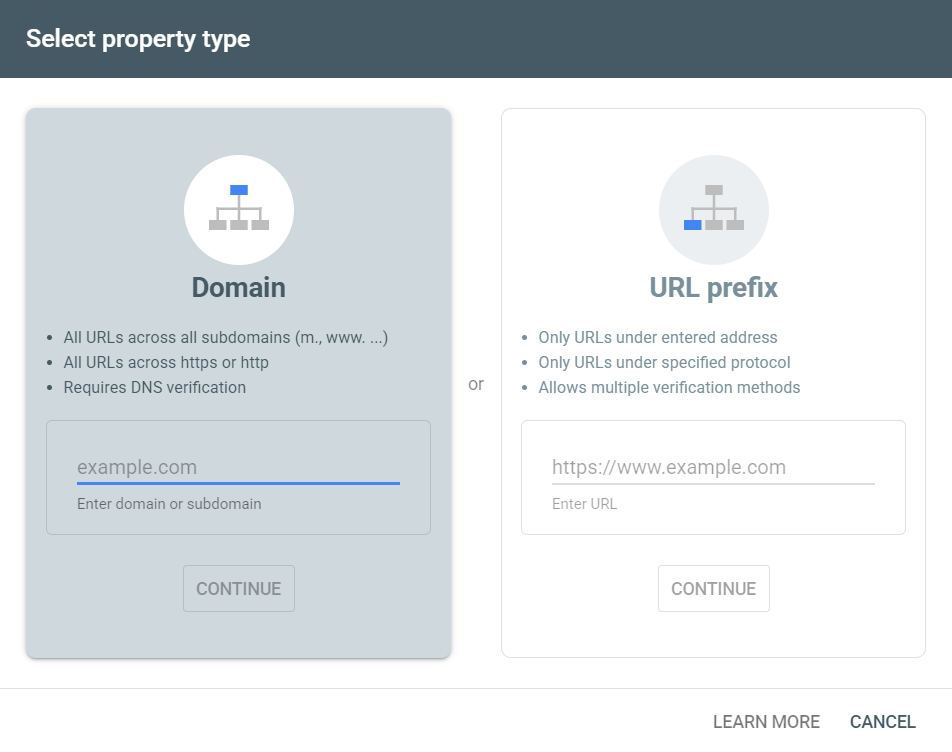
Once you have verified the site using either method, Google starts crawling it, which means it visits your pages and reads them, and your data then begins to appear in the Search Console, usually within a few days.
How Your Brand Looks in Google
Here is a small test we often run together with a store owner, and it takes about a minute. Search your store’s name on a phone, and you should see the homepage with a few extra links beneath it (called sitelinks) and a small logo beside the result (called the favicon). If either one is missing, Google may be unsure how your site is organized, and that is worth knowing before we go any further.
Key takeaway
Fix tracking before anything else, because every later decision in the audit depends on it.
How to find it
Search Console covers most of this, especially the Page indexing report and the Manual actions report (penalties handed out by Google reviewers).
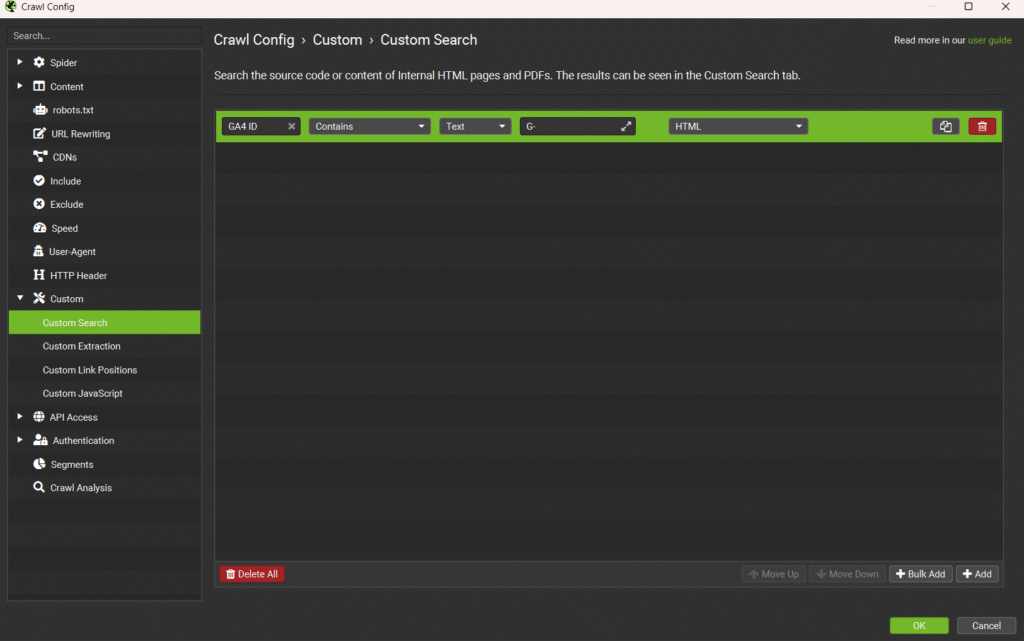
In Screaming Frog, go to Configuration > Custom > Search and paste in your GA4 ID (it starts with “G-“), and the crawl will then list any page where the tag is missing or appears twice. For sitelinks and the favicon, simply search your brand name on a phone.
In the checklist
This section has 7 checks. Mark them off in the sheet before you move on to section 2.
2. Crawlability and Indexation: Can Google (and AI) Reach Your Products?
Technical SEO for ecommerce starts with making sure Google can reach your pages, so this is the next thing we check, and it is worth pausing on the two words that matter most here. Before Google can show a product, it has to visit the page (called crawling) and then save it (called indexing), and a product that fails either step will not appear in search, however good it may be.
Robots.txt and Sitemaps
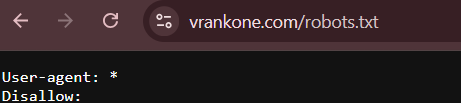
Robots.txt is a small file that acts like a “do not enter” sign for search engines, telling Google which parts of your store it may visit and which it should leave alone.
How can you see yours? Simply type your store address followed by /robots.txt into a browser, for example https://www.yourstore.com/robots.txt, and the file will open as plain text.
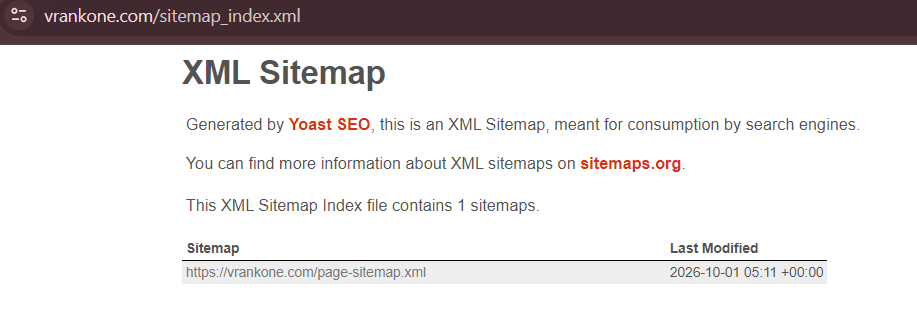
Your sitemap is the other half of the story. It is a file that lists the pages you want Google to find, rather like a map of your store that you hand over at the door.
To find yours, type /sitemap.xml after your store address, for example https://www.yourstore.com/sitemap.xml. Some platforms use /sitemap_index.xml instead, and if neither opens, look at the last lines of your robots.txt file, since the sitemap address is usually listed there.
Faceted Navigation: The Biggest Ecommerce Crawl Trap
Filter menus are wonderful for shoppers, since someone can narrow 400 dresses down to six by choosing a color, a size and a price. But have you considered what each of those choices does behind the scenes? Every filter combination can create a new web address, so a single collection page can turn into thousands of almost identical pages, and this is one of the most common problems we meet on ecommerce sites.
Google’s Gary Illyes has said that filter menus cause about half of the crawling problems Google sees, and add-ons to web addresses, such as the sort and add-to-cart parts of a link, cause another 25% (Search Engine Land).
Google’s own faceted navigation guidance suggests blocking the filter pages you do not need in search, and empty collections deserve the same treatment, because a collection with no products gives neither shoppers nor Google anything useful.
user-agent: Googlebot
disallow: /*?*products=
disallow: /*?*color=
disallow: /*?*size=
allow: /*?products=all$
One Version of Your Site
Your store should open at one web address only. That means HTTPS (the secure version of a site, shown with a padlock), with either www or non-www, and every other version should send visitors automatically to the one you use.
How can you tell whether your own store passes? To check, type all four versions of the homepage into a browser:
http://store.comhttp://www.store.comhttps://store.comhttps://www.store.com
Each one should end up on the same HTTPS address with a padlock and no security warning, and you can then paste the same four into a free tool such as httpstatus.io.
The three versions the store does not use should each show one 301 (a permanent redirect) to the version it does use, and that version should show 200, which means the page loads normally. A security warning on one version usually means the SSL certificate does not cover both the www and non-www names, which a developer or hosting provider can fix.
Letting AI Search Engines In
Very few checklists cover this yet, and we think that is a mistake. AI companies run two kinds of bots: training bots, which collect pages to teach their AI models, and search bots, which visit pages to answer live questions from users. OpenAI lists them separately in its crawler documentation, with GPTBot used for training and OAI-SearchBot used for ChatGPT search.
Many stores block these bots by accident, because a security app or a hosting setting may block all bots by default, and that can remove the store from ChatGPT’s shopping answers. We therefore suggest checking your robots.txt file to make sure OAI-SearchBot is allowed.
Rendering and Server Errors
Server errors (called 5xx errors) mean your store failed to deliver a page when Google, or a shopper, asked for it. They often appear during sales, precisely when traffic is highest, and every failed visit is a lost chance to sell, so it is worth asking your hosting provider whether your store can handle a rush of visitors.
A different problem is a page that loads for a shopper but looks incomplete to Google. Some review widgets, for example, load in a way that Google can miss, so your reviews may not appear in what Google sees. Google used to let you view a saved copy of a page to check this, but it stopped in 2024, and today the better route is URL Inspection in Search Console, which shows what Google sees on a page, including whether reviews, prices and stock status appear.
How to find it
In Screaming Frog, open Response Codes for server errors and Security for unsafe http links, and in Semrush Site Audit, the Crawlability and HTTPS reports show the same.
In the checklist
This section has 14 checks. Mark them off in the sheet before you move on to section 3.
3. Site Architecture and Internal Linking
Next, we check your site structure, which is how your pages connect, from the homepage down to each product, and it matters twice over.
Menus and Click Depth
Every collection you want to rank should appear in the top menu, or at most one click away from it, and nothing important should sit more than four clicks from the homepage. Breadcrumbs, the small trail such as Home > Men > Shoes near the top of a page, help shoppers and Google see where a page sits, much like a signpost in a large building.
Orphans and Broken Paths
An orphan page is a page that no other page links to, so neither visitors nor Google have any way to reach it from inside the store. Products added through apps or bulk uploads often end up as orphans, and broken links, along with links that point to a page that has moved, should be updated to point to the final address.
Shopify: URL quirks
On Shopify, the same product can show up under two web addresses.
For example, one link may look like /collections/x/products/y while another looks like /products/y, and links to the store.myshopify.com address cause a similar split, which leaves Google unsure which version to show.
Template Headings and Blog Links
Headings, such as the H2 and H3 styles, are meant to label the sections of a page, but some menus and footers use them for decoration, which confuses Google about what each page is really about. A developer can usually fix this in the theme.
Blog links are a separate matter, and they matter just as much. Each article should end with a few related posts, the blog should be linked from the footer, and every post should link to the collections it talks about, so that a curious reader always has somewhere useful to go next.
How to find it
In Screaming Frog, Crawl Depth shows how many clicks each page is from the homepage, and Response Codes lists broken and redirected links. For orphan pages, run Crawl Analysis with Search Console connected, or use the Internal Linking report in Semrush Site Audit.
To find orphan pages, connect Search Console to Screaming Frog and run Crawl Analysis, and Semrush Site Audit’s Internal Linking report will also list orphan pages, click depth and broken links in one view.
In the checklist
This section has 11 checks. Mark them off in the sheet before you move on to section 4.
4. Redirects, Status Codes and Canonicals
Here, we check the short codes your pages send back, and every web page sends one whenever someone visits it.
Redirect Hygiene
Discontinued products and seasonal collections could leave redirects behind, and over the years those redirects pile up.
A redirect chain is like being forwarded through three receptionists before you finally reach the right person, and a loop is what happens when the last receptionist sends you straight back to the first, which is exactly as frustrating for Google as it would be for you.
When a page is removed for good, send its visitors to the new page with a permanent redirect, which uses a 301 code, and avoid temporary redirects (302), because Google may keep the old page in its index.
Redirects built with JavaScript (code that runs in the visitor’s browser) should likewise be replaced with standard redirects, because search engines do not always follow the JavaScript kind.
Canonicals Done Right
A canonical tag is a line of code that tells Google which version of a page is the main one, so product variants, filtered pages and duplicate product addresses should all point to one main address. If that main address is broken, Google may drop all the copies from search, which is a painful way to lose a product page.
The tag sits in the head of the page and looks like this:
<link rel="canonical" href="https://www.yourstore.com/products/blue-shirt" />
A variant or filtered address, such as the same product with ?variant=12345 added at the end, should carry the very same tag, so Google knows which version to keep.
Outbound Link Quality
Older blog posts often collect broken links to other websites, and links to sites you no longer work with, such as an old supplier or a former partner, should be marked ‘nofollow’ (a tag that tells Google not to vouch for the link). Broken images should be fixed or removed at the same time, since they leave a page looking neglected.
Key takeaway
Send every retired URL to its final page with one 301, and point each canonical at a live, indexable page.
How to find it
In Screaming Frog, Reports > Redirects > Redirect Chains shows chains and loops together, and you can then filter Response Codes for 302s, check the Canonicals tab for canonicals pointing at non-indexable pages and use the External tab for broken outbound links.
Semrush Site Audit flags the same problems by name: redirect chains and loops, temporary redirects, broken external links and broken canonical URLs.
In the checklist
This section has 12 checks. Mark them off in the sheet before you move on to section 5.
5. Page Speed and Core Web Vitals
Next, we test how fast your pages load, because speed affects sales, and you might reasonably ask whether a fraction of a second can really matter. Google found that 53% of mobile visitors leave a page that takes longer than three seconds to load (Think with Google).
In a separate study called Milliseconds Make Millions, Google and Deloitte found that making a mobile site just 0.1 seconds faster lifted retail conversion rates by 8.4% and retail spend by 9.2% (web.dev).
The Three Core Web Vitals
Core Web Vitals are three measures of how a page feels to use, and it helps to picture a shopper holding a phone. The first, Largest Contentful Paint (LCP), shows how fast the main product image or banner loads.
The second, Interaction to Next Paint (INP), shows how quickly the page reacts when someone taps a button, and the third, Cumulative Layout Shift (CLS), shows whether the layout jumps around while reviews or banners load, which is the reason a shopper sometimes taps the wrong button.
| Metric | What it measures | Good score |
|---|---|---|
| LCP | Loading speed of the main content | 2.5 seconds or less |
| INP | Responsiveness to taps and clicks | 200 milliseconds or less |
| CLS | Visual stability | 0.1 or less |
Google measures these scores on real visits, so they reflect what shoppers actually experience.
You may also come across an older measure called First Input Delay (FID) in some checklists, but Google replaced it with INP in March 2024, so you can safely ignore FID (web.dev).
The App and Theme Bloat Problem
Every app you install can add its own styling code and scripts to every page, even to pages where the app is not needed, and many apps leave that code behind after you uninstall them. Over time, this slows product pages down, especially on phones, where a large share of shoppers browse.
Images: The Heaviest Thing on a Product Page
Large images slow pages down more than anything else, so shrink images before you upload them and use a modern format such as WebP. Images further down the page can load as the shopper scrolls, but the first product image should load straight away, because it is usually the first thing a shopper sees.
Key takeaway
Remove unused apps and compress images before attempting anything more technical.
How to find it
In Semrush Site Audit, open the Core Web Vitals and Site Performance reports to see which pages are slow, and in Screaming Frog, go to Configuration > API Access and connect PageSpeed Insights to get a speed score for every page.
Images > Over 100 KB shows the heavy images, and for a single page you can simply paste its address into PageSpeed Insights.
In the checklist
This section has 9 checks. Mark them off in the sheet before you move on to section 6.
Get the 108-point ecommerce SEO audit sheet we use with clients
Every check is grouped by category and rated for Impact and Difficulty. Free, in Google Sheets.
6. Structured Data and SERP Appearance
In this step, we check your structured data, also called schema, which is extra code that tells Google facts about a product, such as its price, whether it is in stock and its star rating.
When Google can read these facts, it can show them right under your search result, and that small addition can influence which listing a shopper clicks.
Product Schema Puts Price, Stock and Stars in Search
Product schema covers the price, availability and average star rating, and when it is set up correctly, those details can appear in your search listing and draw more clicks. Test it with Google’s free Rich Results Test, and remember that star ratings often break after a store changes its reviews app, so test again after any change.
Schema and AI Answers
Structured data also helps AI search tools, which pull clean facts from pages to answer questions, so clear product details make your store easier for them to quote, and we come back to this in section 13.
Key takeaway
Retest product schema after every app change, because stars, price and stock in search all depend on it.
How to find it
In Screaming Frog, turn on structured data extraction and validation, then open the Structured Data tab to see pages with errors or missing schema.
Semrush Site Audit’s Markup report shows which pages carry schema and which of it is invalid. A product page can also be tested in Google’s Rich Results Test, and for People Also Ask, you can filter Semrush Organic Research by that SERP feature.
In the checklist
This section has 4 checks. Mark them off in the sheet before you move on to section 7.
7. On-Page Tags: Titles, Meta Descriptions, Headings and Alt Text
Now we review the tags on each page, which are the first things search engines read, and on a store with 5,000 products one wrong setting can repeat 5,000 times. That is why we check the settings that control the tags, and not only the individual pages.
Title Tags at Catalog Scale
The title tag is the clickable headline in search results. Many stores use a setting that adds the product name and the store name to every product, and collections often end up with identical titles, so Google struggles to tell them apart.
We suggest putting the main keyword first and the store name last, and keeping titles around 60 characters, because Google cuts off longer ones.
Meta Descriptions That Sell
A meta description is the short summary under the title, and missing or duplicate descriptions are common on variants and paginated collections. Price cues, delivery details, cash on delivery (COD) and offers all belong in them, and since Google may rewrite the text, uniqueness matters more than exact length.
One H1 and a Logical H2 Structure
Each page needs one main heading, called an H1. Some website designs put the logo in the H1 spot, so every page ends up with two, while others leave product pages without one, and it is worth checking that every page has exactly one.
Alt Text for Product Images
Alt text is a short written description of an image, and a file name like IMG_2034 tells Google nothing. Describe the color, material and angle instead, because good alt text also helps products appear in Google Images and Google Lens.
How to find it
Screaming Frog handles this best. The Page Titles tab filters for Missing, Duplicate, Multiple and Over 60 Characters, the Meta Description and H1 tabs offer the same filters, and Images > Missing Alt Text lists every image without a description.
Semrush Site Audit flags the same issues, and its On Page SEO Checker shows where target keywords are missing from titles and headings.
In the checklist
This section has 13 checks. Mark them off in the sheet before you move on to section 8.
8. Keyword Targeting: Collections, Products and the Homepage
Here, we check that every page is built around one keyword, which is the phrase a shopper types into Google, and the reason is simple: when two pages are given the same job, they end up competing with each other.
One Page, One Job
Each collection and key product should target one main keyword. When two pages target the same keyword, they compete with each other, which SEO people call cannibalization, and the homepage should target the broadest search phrase your customers use before buying.
Collection Pages Are Your Money Pages
Most collection pages are a product grid with no copy, and that is a missed opportunity, because adding 150 to 300 words of original buying advice, sizing or material details, plus a few FAQs, gives Google more to rank.
You may have heard advice to add ‘LSI keywords’ to your pages, but Google’s John Mueller has said LSI keywords do not exist, so you can ignore that advice. Instead, cover the details buyers look for, such as fabric, fit or occasion.
Thin and Copied Content
Manufacturer descriptions appear on dozens of retailer sites, so a product page with fewer than 200 words and nothing unique gives Google little reason to rank it above the others.
Own Your Brand’s Review Searches
A dedicated “[Brand] Reviews” page that collects testimonials and customer photos means the top result for that query belongs to the store and not to a complaints forum, and few things reassure a hesitant buyer more than finding honest reviews in one place.
How to find it
In Semrush, Organic Research > Pages shows which page ranks for which keywords, and the Cannibalization report in Position Tracking flags pages competing for the same term.
In Screaming Frog, enable the near-duplicate and low-content checks, then open Content > Low Content Pages and Near Duplicates, and to spot copied manufacturer text, paste one sentence into Google inside quotation marks and count the sites that return it.
In the checklist
This section has 7 checks. Mark them off in the sheet before you move on to section 9.
9. Content and Blog: Earning Traffic Before the Sale
Most shoppers research before they buy, and a ₹15,000 mattress is rarely a first-visit purchase, so blog content that answers early questions earns visibility long before the sale. In this step, we check whether your blog is set up to do exactly that.
A Blog With a Plan, Not a Diary
Articles that answer buyers’ questions should link to the matching collection, such as guides like ‘how to choose’ and comparisons like ‘X vs Y’, and a content calendar only works if the team actually follows it.
Make Long Posts Easy To Use
A table of contents is a clickable list at the top of a long article, and it lets readers jump to the part they need, while Google can sometimes show those jump points under your search result. Embedded product videos help too, especially when the YouTube description links back to the post.
Basic Quality Signals
Spelling and grammar errors on product and blog pages hurt trust before they hurt SEO, because a shopper who notices careless mistakes begins to wonder what else was handled carelessly.
Let Customers Write Content for You
Reviews, Q&A and customer photos add fresh, original text and long-tail phrases (longer, more specific searches) to product pages, which means your customers end up writing part of your content for you.
Key takeaway
Plan blog posts around buying questions and link each one to a collection.
How to find it
Screaming Frog has a built-in spelling and grammar check under Configuration > Content > Spelling & Grammar that flags errors on every page.
For planning, Semrush’s Keyword Magic Tool and Topic Research show the questions buyers search before they purchase.
In the checklist
This section has 7 checks. Mark them off in the sheet before you move on to section 10.
10. UX Signals That Affect Rankings and Conversions
Next, we look at user experience (UX), which is how easy a store is to use, and it decides whether search visitors stay once they arrive.
Where SEO Traffic Leaks Out
A useful 404 page keeps shoppers from leaving when a product is gone, and a 404 page is simply the ‘page not found’ message visitors see when a link is broken. Add a search bar, links to your top collections and a few bestsellers, and give each page one clear next step, such as a button that says ‘Shop the collection.’
Readable and Accessible
Check the font size, the color contrast and how far apart the buttons sit on a phone, so that shoppers can tap the right one without frustration. Accessibility features, such as alt text and clearly labeled form fields, help screen readers and also help Google understand the page.
Watch Real Behavior
Heatmaps are colored maps that show where visitors click and where they stop, and Microsoft Clarity provides them for free, along with recordings of real visits. Have you ever wondered why visitors leave a page that looks perfect to you? A recording will often answer that question quickly.
Key takeaway
Make the 404 page useful, keep one clear CTA per landing page and watch real visitors with a heatmap.
How to find it
Most of this sits outside the two main tools. Screaming Frog’s Response Codes > Client Error (4xx) shows how many URLs could land visitors on the 404 page, PageSpeed Insights includes an Accessibility score, and Microsoft Clarity provides heatmaps and recordings.
In the checklist
This section has 5 checks. Mark them off in the sheet before you move on to section 11.
11. E-E-A-T and Trust Pages
Google wants to see that real people who know their products run the store, so here we check that your site shows it.
Google checks this using a set of standards called E-E-A-T, which stands for Experience, Expertise, Authoritativeness and Trustworthiness.
Prove You’re a Real Business
Would you hand over your card details to a store that lists no address and no returns policy? Most shoppers would not, and Google thinks along the same lines. Your store needs About, Contact, Privacy and Terms pages, plus a returns or shipping policy, all linked in the footer, which is the bottom section of every page.
The contact page should show a business address, phone number, email and business hours, and stores that sell health, baby, beauty or high-priced products face closer checks, so these pages matter even more for them.
Who Wrote This?
Blog posts should include a short author bio with real credentials and a link to the author’s LinkedIn profile or other published work, so that readers and Google can see who is giving the advice and why that person is qualified to give it.
What the Internet Says About You
When we audit a store, we always search for “[brand] reviews” and “[brand] complaints”, because reviews on Google Business Profile, marketplaces and forums shape trust before a visitor ever reaches your store.
Key takeaway
Show Google and shoppers that a real business with named experts sits behind the store.
How to find it
This is mostly a manual check, so open the footer and confirm that every trust page is there.
In Screaming Frog, search the crawl for /about, /contact, /privacy and /terms to confirm that each returns a 200 status, and then search “[brand] reviews” and the author’s name to check reputation.
In the checklist
This section has 10 checks. Mark them off in the sheet before you move on to section 12.
12. Off-Page: Backlink Profile Health
Now we check your backlinks, which are links from other websites to your store, and Google treats good ones as votes of confidence. The bad ones, however, can do real damage, particularly those left behind by a low-cost SEO vendor years ago that nobody has looked at since.
Spotting a Risky Link Profile
Watch for sitewide footer links, hundreds of links from one website, and spammy directory listings left behind by old SEO vendors, and compare anything you find with the Manual actions report in Search Console, which section 1 explains.
Disavow: Rarely and Carefully
A disavow file is a list of links you ask Google to ignore. Google already ignores most spammy links on its own, so a disavow file should be used only when you have clear signs of bad links or when Google has sent a manual action (a penalty from a person at Google), and any old disavow file should be reviewed too, since it may be blocking good links.
Earning Links the Ecommerce Way
Infographics and original data, such as size guides, care guides and buying research, give other sites a reason to cite a store, and a genuinely useful guide earns links far more naturally than a request ever could.
Key takeaway
Review existing backlinks and any old disavow file, then earn new links with useful assets like size guides.
How to find it
In Semrush Backlink Analytics, the Referring Domains report shows how many links each site sends, so one domain with hundreds stands out at once.
Backlink Audit marks suspicious links and exports a disavow file, and Search Console’s Links and Manual actions reports offer a free cross-check.
In the checklist
This section has 4 checks. Mark them off in the sheet before you move on to section 13.
13. Beyond the Checklist: Strategic Analysis
A checklist finds problems, but an audit goes further by explaining why traffic dropped and what to fix first. The last five checks do that work, and they sit on top of the 103 checks above. This is the layer we add on our own client audits.
Content Quality and Originality
Many similar, mass-produced articles can compete with each other, especially when AI writes them with little editing, and that can drag down how Google sees the whole site.
Internal Linking and Anchor-Text Map
Anchor text is the clickable words in a link, and we look at how links flow from blog posts to collections and products. We also check whether one page is linked using many different words, a pattern VRankOne found on a recent direct-to-consumer (D2C) audit.
UX and CRO Signal Review
Conversion rate optimization (CRO) review asks whether visitors who arrive from search go on to buy.
AI-Citation Readiness
ChatGPT, Gemini and Google AI Overviews only mention a store if they can access its pages, read its product details and find clear, factual information to quote.
Competitor Gap
The competitor gap shows who is taking the keywords and traffic a store is losing, and that knowledge tells us where the opportunity lies.
How to find it
Semrush Keyword Gap and Backlink Gap compare a store with up to four competitors, and Screaming Frog’s Bulk Export > Links > All Inlinks lists every internal link with its anchor text.
The rest takes an experienced eye, which is why it sits inside a professional audit.
In the checklist
This section has 5 checks. Mark them off in the sheet, then use the next section to decide what to fix first.
How To Prioritize Your Fixes
Once you have gone through the checks, please resist the urge to fix everything at once. Each row in the sheet carries an Impact and a Difficulty rating, which sorts the work into four groups:
- High impact, easy: quick wins, fixed first.
- High impact, difficult: projects with an owner and a deadline.
- Medium impact, easy: fixed when time allows.
- Low impact, difficult: left until last.
The Bottom Line
Small problems multiply across thousands of product pages, so one full audit often finds what one-off fixes miss.
Work through the ecommerce SEO audit checklist one section at a time, and remember that technical SEO for ecommerce matters a great deal, but content, trust and links matter just as much, so please do not skip them.
Our ecommerce SEO services team can then fix what the audit uncovers.
Contact us today to get started.
Get the 108-point ecommerce SEO audit sheet we use with clients
Every check, grouped by category, with Impact and Difficulty ratings. Free, in Google Sheets.
FAQs
How often should an ecommerce site be audited?
Once a year is a good rule. Run a full audit after any store move, redesign, platform change or large app install, and check Search Console each month in between.
How long does an ecommerce SEO audit take?
A quick health check takes a few days. A full strategic audit, including competitor research, takes a few weeks. The time depends on how many products the store has and how deep the audit goes.
What tools do I need for an ecommerce SEO audit?
Screaming Frog (free up to 500 URLs) crawls the site, and Semrush covers site health, keywords, competitors and backlinks. Google’s free tools fill the gaps: Search Console, GA4, PageSpeed Insights and the Rich Results Test.
What is the difference between an ecommerce SEO audit and a regular SEO audit?
An ecommerce audit covers problems that regular websites rarely have. Examples include filter menus that create duplicate pages, one product showing up under several web addresses, prices and stock that don’t appear in search results, and too many apps slowing pages down.
Can I do an ecommerce SEO audit myself?
Yes. A checklist and the right tools will help you find most problems. The harder part is deciding what to fix first and finding the real cause of each one. That’s where an agency audit adds the most value.
What should I fix first after an ecommerce SEO audit?
High-impact, easy fixes such as tracking errors, wrongly blocked pages and missing title tags. Larger projects like speed work and collection page content come after.
Should I block AI crawlers on my store?
Not all of them. Training bots like GPTBot can be handled separately from search bots like OAI-SearchBot. Blocking the search bot can remove your store from ChatGPT’s search answers, so check that it’s allowed.
Is a Shopify SEO audit different?
Mostly the same. A Shopify SEO audit checklist also checks for duplicate product addresses such as /collections/.../products/..., links to myshopify.com, and scripts added by apps. You can change the robots.txt file on Shopify through a template file called robots.txt.liquid, which your developer can help with (Shopify’s guide).
Does page speed affect ecommerce sales?
Yes. Google and Deloitte found that a 0.1-second faster mobile site lifted retail conversion rates by 8.4% and retail spend by 9.2% in the “Milliseconds Make Millions” study.
Do collection pages need written content?
Yes. A bare grid of products gives Google little to rank. Around 150 to 300 words of helpful buying advice, plus a few FAQs, helps a collection page compete for searches from people who are ready to buy.